The plan is to really dig down on vehicle extractions and create as much parsers as I can from the end of July to December.
There is a real need for more parsing platforms that provide alternate methods for validation and report presentation. Hopefully open source tools can start moving the files in that direction.
Last week the awesome Heather Charpentier (my co-host on the Digital Forensics Now Podcast) and myself were working on building a parser for Google Chats in iOS. As we were looking for the location where images were share via the chat we came across a SQLite database called cacheV0.db in the /private/var/mobile/Data/Application/GUID/Library/Caches/com.google.Dynamite/ImageFetcherCache/ directory.
The cacheV0.db file in context.
Even though we found the images tied to the chats somewhere else in the application directory, this database had a smaller resolution copy of all the files that were sent via the chats to include user avatars that were not shared via user attributable action. The database also contained images that were from deleted chats that did not remain in the folder where the chat images are kept.
It seems this database is similar in function to the Glide Image Manager Cache functionality found in some Android apps where this functionality generates and keeps a thumbnail of every image that has been rendered by the app's interface. In this context rendering means showing the image to the user within the interface of the application. You can watch a video detailing the Glide Image Manager Cache functionality and forensic significance here: https://youtu.be/Rlp-h9V6FI0
The cacheV0.db is comprised of only one table called cache that contains only two fields called id and data. The id field is of integer type and it is sequentially incremented starting at number one. The data field is of blob type and contains the thumbnail like images mentioned previously.
The cache table.
Some details about how the database is implemented per our observations:
We were not able to find any direct connection between the images in the database and the database that contains the chats. It seems it behaves like Glide were the images in the database are used by the application for rendering purposes but are separate from the actual images being send and received in chat interactions.
We knew deleted images where in the database because Heather had created the dataset and had extensive documentation of her process. We knew what images we were missing form the main image directory and we found those copies in the database.
We found another cacheV0.db database in the Google Voice app in iOS. It would seem this is a Google used image rendering managing process. We have not seen this database, so far, outside of Google apps.
In summary it seems this database:
Is used to keep and manage images used by the application for rendering to the user.
Keeps copies of images after the source files have been deleted.
It is used by Google applications.
If anyone comes across additional implementations of this database do share your findings. In order to automate the parsing of these databases in iOS I have created the Image CacheV0 parser in iLEAPP.
iLEAPP parser for cacheV0.db
iLEAPP is a free, Python based, open-source, community driven platform for the parsing of iOS extractions for digital forensics. You can find the tool here: https://github.com/abrignoni/iLEAPP
Have you heard about binary JSON in SQLite? I hadn't. Today I was made aware of it by digital forensics examiner and software developer extraordinaire Alex Caithness.
The latest SQLite version (Version 3.45.0) has the ability to encode and decode JSON data from plain text to binary format and back. Details of this functionality can be found here: https://sqlite.org/draft/jsonb.html
Why would this data need to be in binary format? Per the jsonb specification there will be a reduction in data size as well as faster processing speed.
After downloading SQLite 3.45 on a Windows VM, I generated some synthetic plain text JSON data.
To test conversion from JSON to binary JSON I created a simple database a table called data with two fields: keyf, and jsonblob. The field definiton for the jsonblob field has to be BLOB.
After importing the data I encoded the blob by using the following query: UPDATE data set jsonblobdata = jsonb(jsonblobdata);
After the UPDATE query I ran a SELECT query to see how the data would look.
JSON binary blob
Here is the blob field view with hex.
JSON binary blob with hex
One of the issues with binary data structures is that text searching an extraction will be less and less productive. SQLite binary JSON does not seem to compress data that much but I can foresee a future where it will just like LevelDB or other formats. Being aware of compressed binary data, and the need to access it in clear text format, will be a key function for digital examiners today and into the future.
In order to present the blob data in clear text I used the following query: SELECT keyf, json(jsonblobdata) from data;
The json() function does all the work for you.
Clear-text JSON
After that one can deal with the JSON data as one usually does. For questions or comments find me on all social media here: https://linqapp.com/abrignoni
Tor Browser investigations usually don't go beyond possible user saved bookmarks. Thanks to a find by Loicforensic@protonmail.com (no online presence) we can locate Tor Browser thumbnails of opened tabs in the following Android directories:
The thumbnail files are named in a GUID format with a .0 extension. For example: 8c7defaa-12b9-44f4-ae78-cc8850b92ab4.0
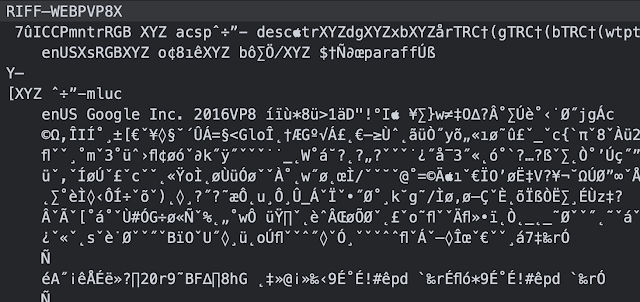
These thumbnails are in RIFF format contained in a WEBPVP8 container.
They can be easily viewed by opening them with Chrome browser. In order to facilitate review I have made an artifact for the Android Logs Events And Protobuf Parser (ALEAPP) framework. Using the PIL library in Python we can convert the file to PNG format for easy reporting.
Here is ALEAPP's TOR Thumbnails report. The report contains the modified time, converted to PNG thumbnail, filename, and file location path.
The need to analyze cars for digital forensic artifacts has grown recently as vehicles have smart mobile features by default. From GPS coordinates, contact databases, call logs, and even automated driving, the forensic value of these items cannot be overstated. Sadly there are not many options regarding tools to parse these data sources. vLEAPP aspires to be an open source platform the community can use to aggregate forensic artifacts found on the most mobile of data sources, cars.
This project started from Geraldine Blay's idea of being able to easily parse any car data source in a way that easily enables the backtracking of report data to source data. We decided to use the xLEAPP code base to do so.
Challenges
Dealing with cars brings a host of challenges to the examiner. Some are:
Data extraction.
In order to pull data from infotainment systems special tooling is usually needed. Many times a chip-off is required. This can be a labor intensive process that requires extensive training.
vLEAPP plays no role in the data extraction process.
Lack of standardization.
Different brands will have different ways of developing their navigation, infotainment, and sensor data recording systems. Sometimes there are different ways of doing these within cars and models of the same brand. It goes without saying that the digital forensics process is has to be well executed. Artifact identification and parsing automation is needed in this field.
Hopefully with the arrival of Google's Android Auto and Apple's CarPlay there will a more unified data source type across vehicle brands.
Unfamiliar file systems
File systems in use by cars might not be recognized by many forensic tools. The QNX file system by Blackberry is one example. Some examiners resort to carving in the hopes of getting relevant data from these nono-supported file systems. Be aware that using branded forensic tools might not help where other more traditional computing processes might. For example QNX file systems can be accessed using a Linux Ubuntu distribution. After accessing the logical files in the QNX file system you can package them all up in a zip file for analysis in any tool or by hand. The following video is a step by step process on how to do so.
Solutions
vLEAPP provides a way to report on forensic artifacts using Python in a way that abstracts the generation of HTML, KML, TSV, and SQLite reports. The examiner focuses on where the data is located and what to pull from it. vLEAPP handles the rest. Here is a video showing how it works.
If you are not familiar with Python or how to run scripts check this short video out. It will guide you from installation to script usage. Really easy and straightforward.
Conclusions
New data sources that are case relevant will continue to surface. As digital forensic examiners we will be well served to learn some coding. Alex Caithness said it best: Learn to code because every artifact exists because of code.
If you would like to learn Python from a digital forensics examiner's perspective and contribute to this or any of the other xLEAPP projects check out the following DFIR Python Study Group playlist. It will take you from knowing no Python to parsing protobuf files and SQLite databases.
Any questions or any comments I can be reached on twitter @AlexisBrignoni and email 4n6[at]abrignoni[dot]com.
Until not too long ago extracting data for forensic analysis from Chromebooks seemed impossible. Thanks Daniel Dickerman's workflow we can extract data provided you have a username and password for the device.
Thanks to Magnet Forensics the process has been automated and now its implementation is available as a free software tool called the Magnet Chromebook Acquisition Assistant.
Currently CLEAPP parses 38 artifact categories. The project wouldn't be what it is without the contributions from Alex Caithness and Ryan Benson. Thank you so much!
Thank you gentlepeople <3
Installation
If you are familiar with how iLEAPP of ALEAPP works then you already know how to use CLEAPP. These projects are done in python. If you are not familiar with how to run python scripts just follow the steps in the following video.
Run the cleappGUI.py script for the graphical user interface version. It will look like this:
Click around and done
Notice the list of modules on the left. You can parse all or select individual modules. CLEAPP is pretty fast so for most purposes running with all modules enabled is recommended.
Here is a short list of some modules it supports:
Chromebook device details
Chromebook device logs
Chromium Browsers
Instagram Threads
Chromium LevelDB data stores (Thanks Alex Caithness & Ryan Benson)
Microsoft RDP
Real VNC
Google Docs
and tons more...
After CLEAPP finishes processing the output will be in the following formats:
HTML report
Tab separated values text files for every artifact
KML files for artifacts that have geolocation data points
SQLite timeline file for artifacts that have timestamps
SQlite contacts file for artifacts that have contacts information
The HTML report contains the categories and artifacts on the left of the report.
HTML report
The Device Details tab will have information on the Chromebook like serial number, current operatin system version, and more.
Device Details
One of the interesting facts about Chromebooks is that they can run Android apps. As time permits I plan to merge all ALEAPP artifacts for use in CLEAPP and make sure that both projects support Android artifacts.
Since this is a community project we will be more than happy to have additional collaborators.
For the last couple of days I've been working creating a parser of Discord JSON chat files using iLEAPP. If you are not familiar with iLEAPP it is a Python 3 framework designed to parse useful forensic artifacts from iOS devices. More on iLEAPP here. I wanted to validate some findings on a case I am working with the amazing @i_am_the_gia and as part of the process I used the newly created parser on @Josh_Hickman1 excellent iOS testing images. You can get his testing images here.
Here is iLEAPP's HTML report for the chat:
Here is the output for the Discord user's email and user ID:
In that same moment I watched the most amazing trailer for The Mandalorian Season #2 thanks to @KevinPagano3. As you all should know by now, the Child just steals every scene with just how cute it is.
Going back to my report I copy one of the URLs in the attachment column and pasted it into an internet connected browser to see if it would come up. In past (2017) I did some testing on Discord for Android and found out that the links in chats could be copy-paste into a browser and be accessible from anywhere by anyone.
With Josh's image I confirmed that was still the case. And what did the URL image in the chat contain?
Coincidence? I think not. :-D
As always, I can be reached on twitter @AlexisBrignoni and email 4n6[at]abrignoni[dot]com.
Search for user_id_cache and email_cache It's only the user id, and not the username. Search the messages in the cache.db (iOS) or 50.json (Windows) to match up the userid with the username.
Thank you so much TheKateCain. Super useful information!
Greetings! Below is a list of assignments from recent classes.
Reminder:Assignments listed below indicate what to complete before class; make sure that you are signed in to Discord in order to access the practice files
🐍
Class 10 on 06/25/2020
No homework / study hall
Class 11 on 06/30/2020
No homework / study hall
Class 12 on 07/02/2020
Conduct online research of argparse and make a script that takes two arguments and prints them to screen